Overview of IYP data
Given the diversity of datasets integrated into IYP, one of the first challenges when working with IYP is to get an overview of the data that is available. We cover these with the two following sections:
- Internet Health Report (IHR) provides a high-level web interface based on the most important IYP datasets.
- IYP data modeling provides an overview of the underlying data model.
Internet Health Report
The easiest way to browse the IYP database is to visit the Internet Health Report website. There you can search for an Internet resource (e.g., AS, prefix, domain name) and get IYP data related to that resource.
- Enter the resource into the search field in the top left corner.
- Select one of the Routing, DNS, Peering, Registration, or Rankings tabs (the time series Monitor tab is not based on IYP).
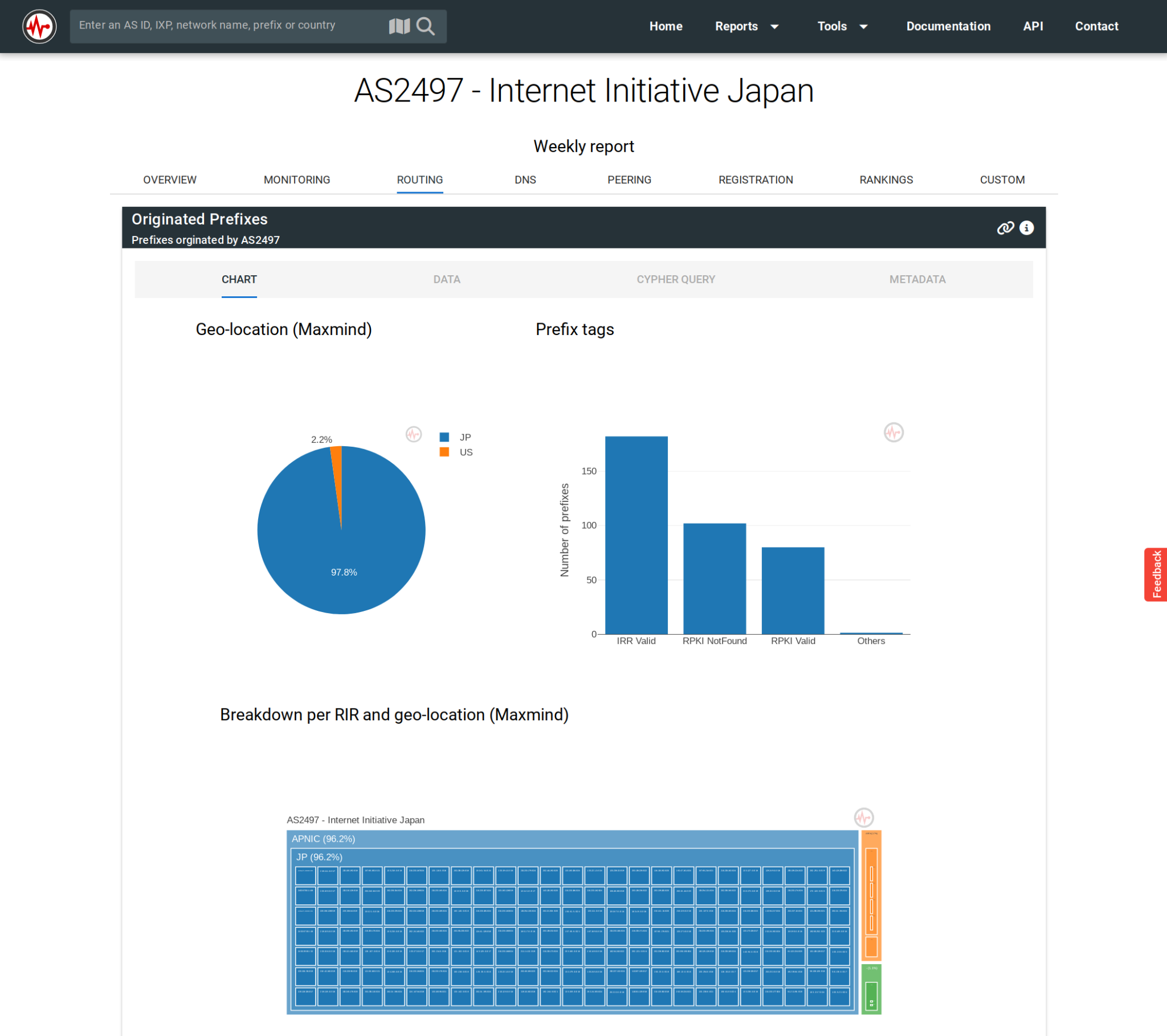
The above figure shows the Routing tab for the Internet Initiative Japan network (AS2497). All other tabs (except Monitoring) are providing IYP data via different widgets.
For each widget, you will find Chart, Data, Cypher Query, and Metadata tabs.
- The Chart tab shows a visual representation of the data.
- The Data tab gives the raw data in a table format.
- The Cypher Query tab gives you the exact query we used to pull the data from IYP. You can reuse that to query directly the IYP database or craft your own queries. More on how to write your own query in the next section.
- The Metadata tab gives links to the original datasets and information about the freshness of the data.
IYP data modelling
Under the hood IYP is stored in a graph database where nodes represent mostly Internet resources and links give relationships between them. To do that we had to model all datasets integrated to IYP as graphs. For some datasets it makes a lot of sense, for some it may seem counter-intuitive. The IYP GitHub repository contains a readme for each dataset that documents the modelling.
Let’s look at a simple example. The below figure is an extract of BGP data showing the two ASes connected to the University of Tokyo (AS2501):
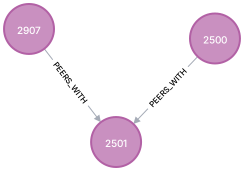
This is very similar to AS graphs we usually draw on a whiteboard. In addition, the number displayed in each node shows the ASN which is actually a property set on the node.
For a counter-intuitive example see the graph below. These are the names associated with AS2501:
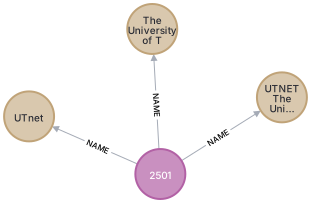
Although we could have assigned a property “name” to our AS nodes, we would not know which value to use for this property. Different datasets give us different AS names. So instead of a property, a name is a unique entity that can be linked to other entities.
The previous example also illustrates two different types of nodes, one AS
node and three Name nodes.
In IYP every node and every relationship are typed.
The list of
node
and
relationship
types is available on GitHub and grows as IYP integrates more datasets.
Nodes and relationships have properties.
For example the asn property enables us to uniquely identify the AS
represented by an AS node.
In the IYP console (introduced on the next page)
click on a relationship or node to see all its properties.
IYP uses properties for three different purposes:
- Identification: Some properties are immutable values that enable the user
to select a specific thing in the database.
For example, all
ASnodes have the propertyasnthat permits distinguishing the different ASes.Countrynodes have the propertycountry_code,HostNamenodes have the propertyname, etc. These properties are documented in the list of node and relationship types. - Non-modelled data: Some datasets provide a lot of detailed information,
more than what IYP is modelling.
In this case IYP keeps non-modelled data in the form of properties.
For example, PeeringDB provides IXP member lists.
This is modelled by connecting
ASnodes toIXPnodes with theMEMBER_OFrelationship. PeeringDB also provides the general peering policy of these ASes, which is not modelled in IYP but available via the propertypolicy_generalof the relationships. These properties are generally not documented in IYP and require a good understanding of the original dataset. - Reference: Every relationship in IYP contains metadata referring to the
origin of the data:
- The
reference_orgproperty refers to the organization providing the original data. reference_time_fetchis the time at which the data was imported.reference_time_modificationis the time at which the data was produced.reference_url_datais the URL of the original dataset.reference_url_infois the URL of the documentation of the original dataset.reference_nameis unique per dataset and is composed of the organization name and dataset name (e.g.,caida.as_relationships_v4). This is particularly useful to select specific datasets.
- The